
What is an SSL certificate?
An SSL certificate lets a website load over HTTPS. It helps encrypt traffic between the visitor and the site and lets browsers show the secure connection indicator.
Most normal websites should not pay extra just to get basic HTTPS. The key is making sure the host can issue SSL and renew it automatically.
- Difficulty
- Beginner
- Format
- Simple answer
- Updated
- May 2, 2026
Quick answer
An SSL certificate is what lets your site use HTTPS instead of plain HTTP. For most hosting customers, the important question is not the certificate brand. It's whether the host can issue SSL for the domain, renew it automatically, and redirect visitors to HTTPS.
If the browser says the site is not secure, check DNS, SSL issuance, redirects, mixed content, and Cloudflare or CDN SSL mode.
How SSL works in hosting
The domain must point first
The host usually needs DNS to point correctly before it can prove control and issue the certificate.
The certificate is issued
The host, certificate authority, or CDN confirms the domain and creates a certificate for that hostname.
The web server uses it
Apache, Nginx, LiteSpeed, or another server presents the certificate when visitors use HTTPS.
The site redirects to HTTPS
Once SSL works, the site should send HTTP visitors to HTTPS and avoid mixed content.
How to enable SSL on a hosted site
Point the domain to the right host
SSL cannot reliably issue if DNS still points at the old host, a parked page, or the wrong CDN configuration.
Use the host's SSL tool
Look for SSL, HTTPS, AutoSSL, Let's Encrypt, or certificate settings inside the hosting panel.
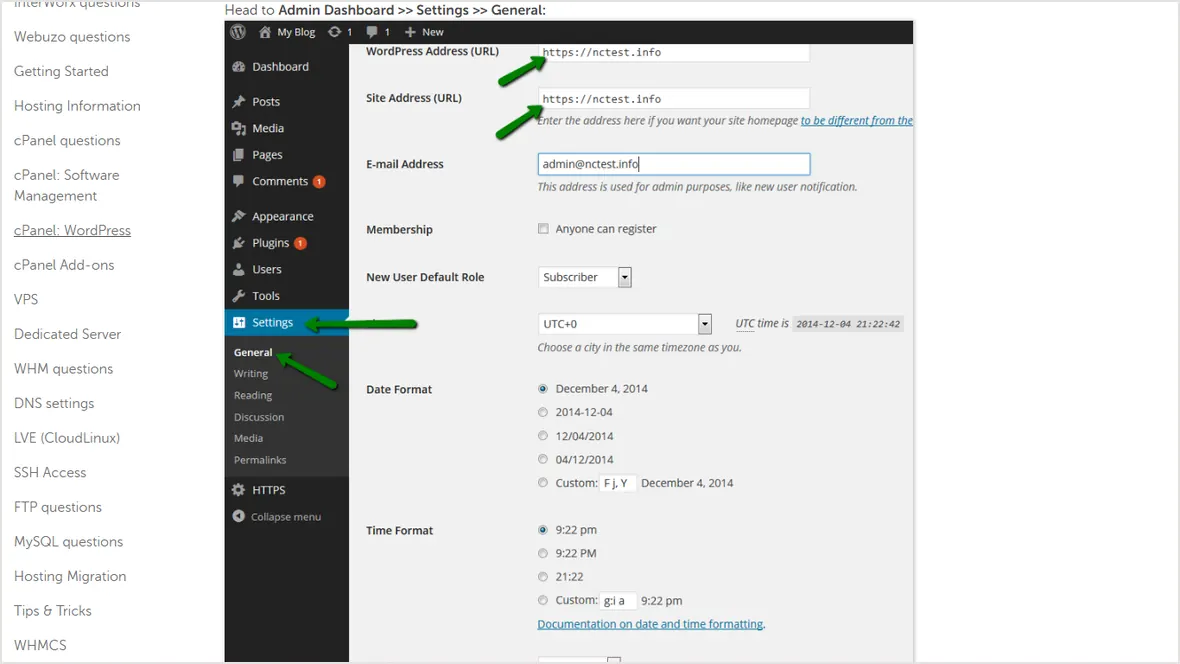
Set WordPress URLs to HTTPS
In WordPress, the site URL and home URL should use https after SSL is active.
Check redirects and mixed content
Images, scripts, and styles should load over HTTPS. Old HTTP asset URLs can cause browser warnings.
Common SSL errors
DNS just changed or the domain is not pointed correctly yet.
The certificate covers example.com but not www, or the other way around.
Using the wrong SSL mode can create redirect loops or weak origin encryption.
The page is HTTPS, but old HTTP images, scripts, or CSS still load.
Next step: follow How to enable HTTPS on WordPress.
Official sources checked
Used for a managed WordPress SSL workflow example.
Used for the warning about visitor-to-CDN and CDN-to-origin SSL modes.
Used for WordPress SSL, redirects, mixed content, and verification steps.