
What is web hosting?
Web hosting is the rented server space and software that stores your website files, database, images, and email tools so people can load your site online.
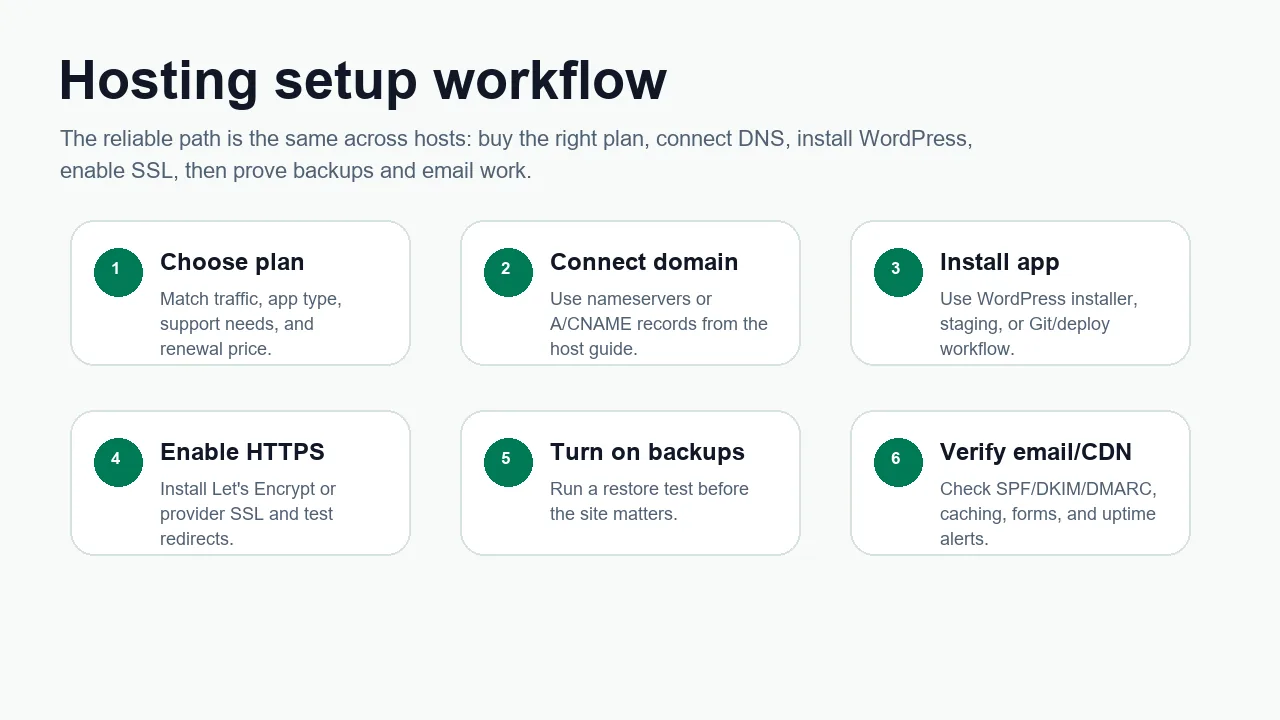
Start here if hosting, domains, DNS, WordPress, and SSL all sound like the same thing. They are connected, but they are not the same service.
- Difficulty
- Beginner
- Format
- Simple answer
- Updated
- May 2, 2026
Quick answer
Web hosting is the service that runs your website on a server. The host stores the files, database, images, scripts, and control panel that make the site work. A visitor types your domain name, DNS sends the visitor to the right server, and the hosting account returns the page.
The domain is the address. Hosting is the place where the website lives. DNS is the set of records that connects the address to the place.
The main parts of a hosting setup
Server space
The files, themes, plugins, uploads, and database live on a server controlled by the hosting provider or by you on a VPS.
Domain and DNS
The domain points visitors to the hosting account through nameservers, A records, CNAME records, and sometimes Cloudflare.
Website software
WordPress, a site builder, static HTML, or a custom app generates the pages visitors see.
SSL and backups
SSL makes the site load over HTTPS. Backups give you a recovery path if updates, malware, or mistakes break the site.
The common hosting types
Shared hosting
Best for most first sites, local business pages, small blogs, and low-risk WordPress sites. It's cheaper because many accounts share the same server environment.
Managed WordPress hosting
Best when the site is WordPress and you want WordPress-specific caching, staging, backups, update tools, and support.
VPS hosting
Best when you need more isolation, root access, custom software, or a server control panel. A VPS also gives you more responsibility.
Dedicated server
Best when one workload needs its own physical machine, predictable heavy resources, custom hardware, or stricter separation.
What should a beginner buy first?
For a normal first website, start with shared hosting or managed WordPress hosting. Move to managed VPS only when the site needs more control, more isolation, or better resource headroom. Buy raw VPS only if you are ready to handle updates, security, backups, monitoring, DNS, and incident response yourself.
Shared hosting is usually enough.
Shared WordPress or managed WordPress is the simplest path.
Use VPS or managed cloud if the app needs server access.
Use stronger WordPress, managed VPS, or managed cloud once revenue depends on uptime.
Next step: use How to choose web hosting in 2026 or the best host for you quiz.
Official sources checked
Used for examples of features commonly bundled into shared hosting plans.
Used for the basic software requirements that hosting must support for WordPress.
Used for internal routing between shared hosting, VPS, and dedicated server decisions.